
Consent-Gating Third-Party Trackers Across a Global Platform
Project Spotlight: ensuring every video embed, analytics script and cookie honors the visitor's OneTrust consent choices.
A Video Is a Third-Party Tracker
A longtime global equipment manufacturing client runs dozens of regional websites, most of which embed product videos from YouTube. An embedded YouTube player contains much more than just a link to a video. It is a full Google application that loads more than a megabyte of code, contacts Google's ad servers and stores a device identifier in the browser, all before anyone presses play. These trackers will continue to follow the user across the web.
When Tracking Becomes a Legal Risk
In Europe, tracking users without their consent violates their privacy rights. Under GDPR and the EU's ePrivacy rules, an IP address and a device identifier can count as personal data, and a site needs the visitor's opt-in consent before it stores identifiers in their browser for tracking. EU courts have also held that a site embedding a third-party tool shares responsibility for the data that tool collects and sends from its pages, and can be held liable for it.
The company already used OneTrust, a consent management platform, to ask visitors for consent, and didn't want to switch vendors. But adding a consent platform isn't a complete solution: Klish Group had to build the mechanisms to enforce the rules.
At a Glance
45 Sites, 36 Countries
24 EU member states plus the UK, Switzerland, Norway, Brazil, India and others, and five regional sites, in 28 languages.
Every Video Gated
Videos reached the page four different ways, and each could contact YouTube on its own. All four now wait for consent.
Analytics Follows Consent
Monitoring loads only with consent, and stops as soon as it's withdrawn.
The Consent Policy
GDPR covers the EU and the wider European Economic Area, the UK has its own equivalent, and a growing number of other countries have similar laws. Rather than build different behavior for each country, the client applied one strict opt-in model to every regional site outside the US, where no federal law requires opt-in consent.
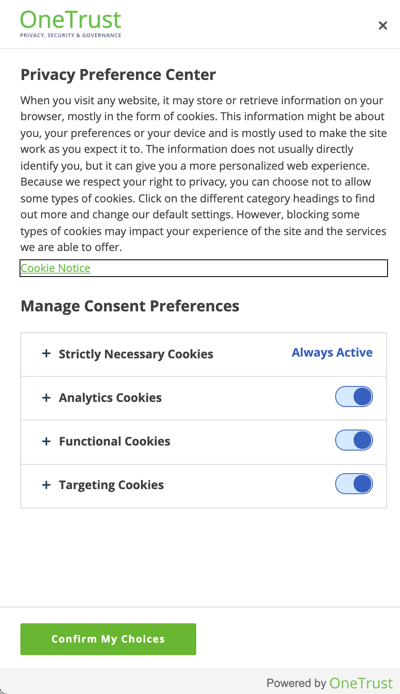
OneTrust maintains the policy: which cookies belong in which category, what language to translate to, and which banner each region sees. Every page checks the visitor's OneTrust choices first. YouTube is a Targeting service, so it stays off until the visitor allows Targeting cookies.
| OneTrust category | Before opt-in | Includes |
|---|---|---|
Strictly Necessary (C0001) |
Always on | Security, load balancing, remembering the visitor's consent choices |
Performance (C0002) |
Off | Visit counts, traffic sources, page load times |
Functional (C0003) |
Off | Language and region preferences, live chat |
Targeting (C0004) |
Off | YouTube video, real-user monitoring, advertising profiles |
How the Site Honors Consent
A browser loads an iframe as soon as it sees a src attribute, but ignores data-src. So every video is published with its YouTube address in data-src instead:
<!-- Loads YouTube the moment the page does -->
<iframe src="https://www.youtube.com/embed/VIDEO_ID"></iframe>

<!-- Loads nothing until a script moves data-src into src -->
<iframe data-src="https://www.youtube.com/embed/VIDEO_ID"></iframe>
When the page loads, a small script checks the visitor's Targeting consent. If it's granted, the script copies the address into src and the video loads. If not, nothing is sent to YouTube, and a consent panel fills the same 16:9 frame with a button to OneTrust's preferences. An example of the compliant and non-compliant versions is below. Any change of choice reloads the page, so the check runs again. The performance-monitoring script uses the same gate.
Compliant vs Non-Compliant
The same product video, loaded by a visitor in the EU who has not provided consent.
- The moment the page loads, the video player contacts YouTube.
- Pages with no video still load YouTube's player script.
- Turning Targeting off does not remove related cookies.
- A plain placeholder holds the video's space. Nothing is fetched from YouTube.
- The message appears in the visitor's language.
- One click opens OneTrust's preferences, and on consent the page reloads with the real video.
Our Compliance Approach, in Practice
The project followed the same approach we bring to every consent management engagement.
Assessment: Every Third-Party Call Mapped
Before changing anything, we traced every request the site made to third-party services, from the video players to performance monitoring.
Planning: One List, Every Environment
A single opt-in list drives the behavior on all 45 sites and their preview environments. Adding a market is one line.
Technical Execution: Every Choice Re-Checked
Any change of consent clears cookies from categories switched off and reloads the page, so every video and script is decided again from the new answer.
How We Verified It
Consent behavior depends on where the visitor is. OneTrust shows a different banner, or none at all, depending on the visitor's region. We used a VPN to browse each regional site as a visitor in that market would, and validated the consent states:
- Before any choice: the region's banner appears, and no video loads.
- Targeting rejected: every video shows the consent panel instead.
- Targeting accepted: videos load and play.
- Consent withdrawn: the page reloads and the withdrawn cookies are gone.
What We Took Away
- Consent is a lifecycle. Blocking on first visit is only half the job. Removing what was already collected matters just as much.
- Compliance is ongoing. New markets, new embeds and new scripts arrive all the time. The rules have to be easy to extend and re-check.
- Every request is a disclosure. Even an image from a third-party server sends the visitor's IP address. Treat each one as data leaving the site.
For the regulations, consent platforms and our full approach, see User Tracking and Consent Management.